Content Marketing
CMS Architecture: Components, Selection and Implementation
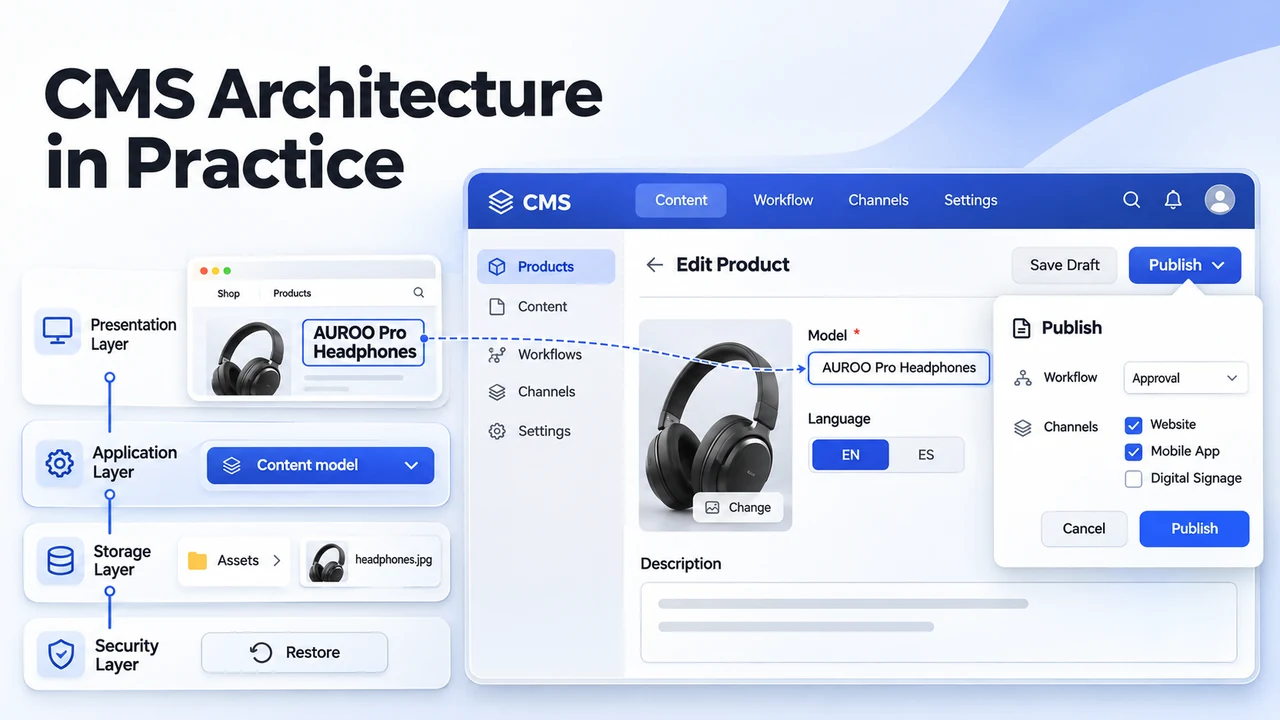
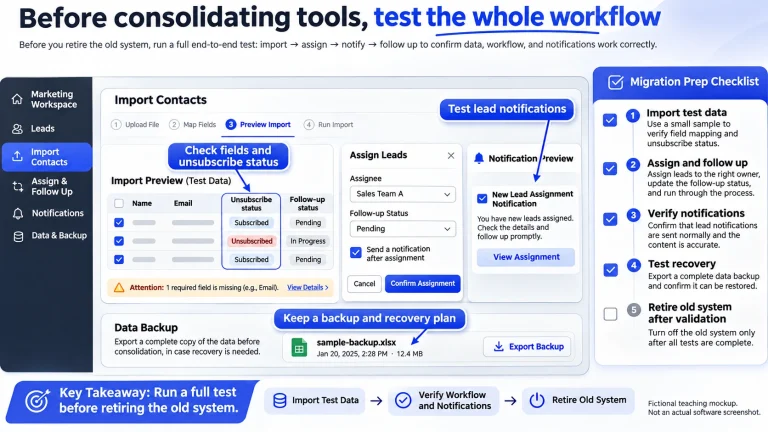
CMS architecture connects content models, editorial workflows, presentation, storage and access controls. Define your content types, languages, channels and maintenance capacity first. Test editing, publishing, SEO fields and recovery with real pages; more modules do not automatically make a system a better fit.
To apply the approach to your website or marketing project, explore AUROO Digital’s website development and landing page optimization, with scope, deliverables and review methods agreed around your needs.
Modern content management systems have moved far beyond traditional website construction. They have become unified platforms for managing enterprise content assets across channels, covering text and images, video, documents, posters, news, product copy, user content, and dedicated campaign pages. They support publication to websites, mini programs, mobile devices, social media platforms, and AI distribution endpoints, making them foundational tools for digital marketing, branding, content operations, and information system implementation. Whether a startup is building a brand website, an SME is operating a content network, a large group is creating a centralized content platform, a government agency is establishing an official portal, or a media organization is building a news platform, a CMS is indispensable.
This article examines content management systems in depth, covering their definition, history, underlying architecture, core functions, categories, commercial value, selection criteria, implementation strategies, practical examples, existing problems, and future trends. It explains modern CMS capabilities and implementation principles systematically, helping organizations of different sizes and industries understand, select, and deploy a CMS effectively, make the most of content assets, and support sustained digital operations.
1. The Definition and Evolution of CMSs
1.1 The Established Definition and Essential Purpose of a CMS
Under the industry’s generally accepted definition, a content management system (CMS) is an integrated software system positioned between a web server and the backend content production workflow. It combines content creation, editing and approval, structured storage, intelligent formatting, distribution across endpoints, access control, analytics, and ongoing maintenance in one digital management platform. “Content” does not mean written news alone: it encompasses all information that can be displayed, distributed, and reused digitally, including text, images, short videos, audio, documents, forms, product data, dedicated pages, user comments, and news updates.
The essential purpose of a CMS is to lower the barriers to creating and maintaining digital content, turn content into assets, standardize processes, distribute content across channels, and centralize management. Before CMSs emerged, updating online content and building website pages depended heavily on developers. Every copy change, image replacement, new page, and news post required frontend or backend involvement, creating high development costs, long iteration cycles, and extremely inefficient operations. Nontechnical staff could not maintain content independently. Through visual interfaces, template-based architecture, and modular functionality, CMSs free up technical resources and allow operations, editorial, marketing, and administrative staff to manage the entire content lifecycle themselves. This separation of content operations from software development is the CMS’s most fundamental value.
1.2 How the CMS Industry Has Evolved
Content management systems have evolved alongside the digital internet through four main stages. They have developed from simple website building tools into enterprise content platforms, with continual advances in functionality, use cases, and architecture.
Stage One: Static Website Building (Early Foundations)
In the internet’s early days, websites consisted of static HTML pages without dedicated content management systems. Building sites, updating content, and changing pages depended entirely on handwritten code. Pages were fixed, with no dynamic updates, data storage system, or permissions management. There was no true CMS: only basic static page display was possible. Content maintenance was extremely expensive, only a small number of large organizations had their own websites, and digital adoption was very limited.
Stage Two: Basic Dynamic CMSs (The Tool Stage)
As dynamic scripting languages such as PHP and ASP spread, the first general-purpose CMSs appeared. Their main functions focused on basic website maintenance, including dynamic news publishing, simple text and image editing, and category management, overcoming the limitations of code-only site building. Easy to operate, deploy, and afford, they spread rapidly among SMEs, individual webmasters, and small organizations, becoming mainstream website tools. However, they had clear shortcomings: limited functionality, poor extensibility, narrow use cases, weak security, and no support for distribution across endpoints. They could meet only basic website content updating needs.
Stage Three: Enterprise CMSs (The Systematic Stage)
With the rise of the mobile internet, mobile websites, mini programs, and social media platforms spread quickly, and PC-only website tools could no longer meet businesses’ multichannel needs. CMSs entered an enterprise development stage, adding support for multiple endpoints, custom templates, tiered permissions, content approval, analytics, plugins, and SEO. Upgraded architectures substantially improved stability, security, and extensibility. General-purpose and industry-specific CMSs also emerged for corporate sites, government portals, media, ecommerce content, and education, transforming isolated tools into standardized content operating systems.
Stage Four: Intelligent Centralized CMSs (Content Assets and Intelligence)
As AI, big data, and cross-channel digital operations became widespread, modern CMSs moved decisively beyond website building to become centralized enterprise content platforms. They combine AI-assisted creation, intelligent formatting, automatic distribution, intelligent SEO, user behavior analysis, content tagging, private deployment, compatibility with Chinese domestic technology, and integration with multiple systems. These capabilities enable intelligent management throughout production, approval, storage, distribution, review, iteration, and reuse. Support for China’s domestic information technology innovation environment, operating systems, and databases has also expanded their use in demanding government, state-owned enterprise, large corporate, and media settings, making CMSs core infrastructure for managing digital assets.
2. Underlying CMS Architecture and Operating Principles
To use a CMS thoroughly and select the right system, you must understand its underlying architecture. Standard modern CMSs use a layered design with clear structure, low coupling, and strong extensibility. Four main layers—presentation, application, data, and operations—have distinct responsibilities and work together to support the entire content lifecycle.
2.1 The Four Core Architectural Layers
First: The Frontend Presentation Layer (The User-Facing Layer)
The frontend presentation layer displays content to end users. It includes PC websites, mobile pages, mini program interfaces, dedicated pages, content detail pages, listing pages, and other visual interfaces. Built around a template engine, this layer allows all page styles, layouts, colors, and typography to be customized through templates without changing the underlying code. All user browsing, clicking, and reading interactions take place here, making it the direct vehicle for presenting a company’s brand and delivering its content value.
Second: The Backend Application Layer (The Core Functional Layer)
The backend application layer is the CMS’s central hub, containing business functions and operating logic for internal operations staff, editors, and administrators. Core functions include creation, editing and formatting, approval and publication, section management, user permissions, plugin management, data configuration, SEO settings, and distribution management. It is the working interface for the full content lifecycle. Visual drag-and-drop tools, one-click publishing, bulk operations, and custom configurations substantially reduce the skills needed to operate it.
Third: The Data Storage Layer (The Content Asset Layer)
The data storage layer supports the CMS through three components: databases, file storage, and caching. Databases store structured data such as section information, copy, user data, permissions, operation logs, and statistics. File storage holds unstructured assets such as images, videos, documents, and creative materials. Caching improves page access speed and the browsing experience. This layer forms the storage foundation for enterprise content assets, ensuring secure, stable, long-term retention.
Fourth: The Operations and Security Layer (The Support Layer)
The operations and security layer ensures stable CMS operation through protection, monitoring, logging, backup and recovery, permission risk controls, and vulnerability fixes. It defends against crawler attacks, malicious access, data tampering, and unauthorized login, records all operations, and supports one-click backup and recovery. It safeguards long-term system stability and security, particularly in government, state-owned enterprise, and financial settings with stringent data security requirements.
2.2 How a CMS Operates
The CMS’s operating logic forms a closed loop: “content production—workflow control—structured storage—distribution across endpoints—data review—iterative optimization.” Staff create and edit content in the backend and validate it through a preset approval process. Once approved, the system automatically synchronizes content to frontend endpoints while storing its data in a structured database. As users browse, visit, and interact, the system collects statistics and generates reports. Operations staff use this feedback to improve content quality and strategy, completing a content operating cycle that continually builds reusable assets.
3. Core Modern CMS Modules and Their Value
Compared with simple traditional website systems, modern enterprise CMSs offer comprehensive functionality across content operations, site management, access control, traffic optimization, data maintenance, and security. Each module addresses a central digital operating problem and delivers practical value.
3.1 The Content Management Module (The Foundation)
Content management is the CMS’s fundamental function, controlling all digital content types throughout their lifecycle. A visual rich text editor supports text formatting, image insertion, video uploads, table editing, attached documents, hyperlinks, and one-click format standardization, allowing beginners to produce professional content quickly. Custom sections can be created for news, products, case studies, solutions, About Us pages, and downloads according to industry needs, supporting website construction and content operations across sectors.
The module also supports bulk uploads, scheduled publication, one-click unpublishing, pinned content, popular recommendations, and topic collections. These features greatly improve updating efficiency, addressing slow manual publication, inconsistent formatting, and delayed updates, particularly on media, information, and marketing websites that publish frequently.
3.2 Templates and Visual Building (Efficient Website Construction)
Modern CMSs offer mature template engines and visual drag-and-drop building tools, with extensive industry templates covering business, government, education, healthcare, ecommerce, and media. Users can build websites directly from templates without coding, completing a basic site in ten minutes. Custom layouts, styles, colors, module additions and removals, and component dragging allow pages to reflect a brand’s character and business needs, overcoming template uniformity.
This module’s greatest value is substantial cost reduction and efficiency improvement. Conventional custom website development takes weeks and incurs high fees, whereas CMS templates enable no-code, low-cost, rapid launches. Users can then make their own iterative changes without relying on developers, substantially reducing construction and maintenance costs.
3.3 Permissions and Workflow Control (Standardized Operations)
Enterprise CMSs provide comprehensive tiered permissions for roles such as super administrator, editor, operations staff, reviewer, and visitor. Precise account-level permissions separate responsibilities for creation, editing, approval, and publication. Custom multilevel review workflows can require editorial self-checks, supervisor review, and final administrator approval before publication, preventing errors, prohibited material, and false information from going live and ensuring professional, standardized content.
This module is widely used by government agencies, large enterprises, and media platforms with stringent content compliance and process requirements. It enables standardized teamwork and avoids disorganized content, unclear accountability, and uncontrolled risks arising from multiple users.
3.4 SEO and Traffic Optimization (Long-Term Customer Acquisition)
Modern CMSs include comprehensive SEO capabilities: custom titles, keywords, descriptions, static URLs, automatic sitemaps, crawler compatibility, internal link optimization, and image ALT tags. These functions align with indexing rules for major search and generative engines such as Baidu, Sogou, and AI question answering. A sound CMS architecture helps content be indexed quickly and keywords rank consistently, generating free, sustained organic traffic in place of expensive advertising and reducing acquisition costs.
CMSs also support generative engine optimization (GEO) for the AI era. Structured content storage and standardized page architecture allow AI engines to crawl and integrate company content quickly, increasing the likelihood of brand exposure in AI answers and capturing emerging traffic opportunities.
3.5 Distribution and Adaptation Across Endpoints (Cross-Channel Operations)
Multichannel operation is a core digital requirement. Mainstream CMSs support building once and adapting across endpoints: a single backend manages PC websites, mobile H5 pages, mini programs, WeChat Official Account content, and dedicated pages. Content is edited once and published simultaneously without repeated production or uploads. Systems automatically adapt to screen sizes and display logic, ensuring attractive pages, smooth loading, and stable interaction on every device.
This function addresses the separate maintenance, fragmented data, inconsistent content, and high costs associated with operating multiple sites. It unifies content control and updates across channels to create an integrated content network.
3.6 Analytics and Performance Review (Precise Operations)
Built-in CMS analytics monitor website visits, visitor sources, time on page, content click-through rates, popular content, and retention in real time, automatically producing visual reports. Teams can identify user preferences, content quality, and channel performance and optimize topics, layouts, and strategies accordingly. This shifts operations from guesswork to precise, data-driven management, continually improving content results and traffic conversion efficiency.
3.7 Security and Backup (Risk Protection)
Enterprise CMSs provide comprehensive defenses against SQL injection, crawler attacks, malicious tampering, and unauthorized access, along with account risk controls and complete operation logs. These safeguard websites and data. Automatic scheduled backups, manual one-click backups, and rapid recovery also prevent content loss caused by failures, attacks, or mistakes, providing lasting protection for enterprise assets.
4. Main Categories of Content Management Systems
CMS products vary greatly in architecture, positioning, and suitable use cases. They can be classified in four main ways—deployment, architecture, application, and open source status—allowing businesses to select according to their needs and avoid indiscriminate purchasing.
4.1 Deployment: Cloud SaaS vs. Private Deployment
Cloud SaaS CMSs run on cloud servers, requiring no company-owned server setup or environment configuration. Users simply open an account, while the provider handles maintenance. Advantages include extremely fast deployment, no maintenance overhead, good value, and continuous feature updates. Limitations include data being stored in the provider’s cloud, less direct control, and limited customization. They suit startups, micro and small businesses, personal websites, and lightweight operations.
Privately deployed CMSs install source code independently on company-owned or dedicated cloud servers. Businesses retain complete control over data and can extensively customize, develop additional functionality, and adapt to Chinese domestic technology. Advantages are very high security, extensibility, and independent control. Drawbacks include longer deployment, dedicated maintenance staff, and relatively higher costs. They suit government agencies, state-owned enterprises, large companies, finance, and healthcare where security and customization demands are high.
4.2 Open Source Status: Open Source vs. Commercial Closed Source CMSs
Open source CMSs make all code public, allowing free downloads, independent deployment, secondary development, and modification. Examples include WordPress, DedeCMS, and EmpireCMS. Advantages include low or no cost, mature ecosystems, and extensive plugins. However, some older systems have weak security, numerous vulnerabilities, no official support, and insufficient enterprise capabilities, requiring professional maintenance. They suit small and medium technology businesses with capable technical teams, limited budgets, and independent development needs.
Commercial closed source CMSs are developed by specialist vendors without public source code and provide dedicated support, maintenance, version development, and security upgrades. Examples include PageAdmin, CmsTop, and TurboCMS. Their advantages are stability, security, comprehensive features, reliable support, and enterprise suitability; their drawback is licensing fees. They suit government bodies and medium to large businesses that lack specialist teams and require stable, secure, standardized operations.
4.3 Architecture: PHP, .NET, and Java
PHP CMSs are the mainstream general-purpose architecture. Easy deployment, broad compatibility, rich ecosystems, and low costs give them a strong SME market presence. They suit general website building and lightweight content operations.
.NET CMSs offer strong stability and security, support Windows servers and Chinese domestic environments, and are represented by PageAdmin. Well suited to government and enterprise settings, they serve government agencies, public institutions, and traditional businesses.
Java CMSs offer high-end enterprise architecture with leading security, stability, and extensibility. They support high concurrency and large data volumes, making them suitable for large groups, media platforms, government portals, and other demanding environments. They are a mainstream architecture for high-end digital projects.
4.4 Application: General-Purpose vs. Industry-Specific CMSs
General-purpose CMSs offer broadly applicable functions without industry restrictions, supporting most corporate websites and basic information sites. They meet general publishing and site management needs, serve the widest audience, and deliver strong value.
Industry-specific CMSs are customized for particular sectors and include dedicated features, such as media and news CMSs, government portal CMSs, ecommerce content CMSs, education course CMSs, and property information CMSs. They address industry-specific operational problems with greater specialization.
5. The Core Commercial Value of CMSs for Digital Operations
A CMS is core digital operating infrastructure, with value across six dimensions: cost control, efficiency, asset accumulation, traffic growth, compliant operations, and long-term development. It supports digital upgrading while addressing the central problems of traditional online operations.
5.1 Reduce Costs, Improve Efficiency, and Simplify Digital Maintenance
Without a CMS, website building, content updates, page changes, and optimization depend entirely on development teams. Labor costs are high and iteration is slow; even tiny content changes require developer coordination and consume technical resources. A CMS fully separates business operations from software development, enabling nontechnical staff to maintain all content independently without coding or technical intervention. This reduces technical labor and maintenance costs. Bulk operations, one-click distribution, and reusable templates multiply production and iteration efficiency, making digital operations lighter and more effective.
5.2 Build Digital Assets and Compound Content Growth
High-quality content is a core enterprise digital asset. Under fragmented operations, content is scattered, difficult to manage or reuse, and easily lost. Structured CMS storage archives news, cases, copy, materials, and pages centrally, with tagging and permanent retention, creating a dedicated enterprise content library. Quality content can be reused and attract traffic over time, compounding its value and generating sustained free traffic and brand exposure as a foundation for sustainable growth.
5.3 Capture Organic Traffic and Reduce Acquisition Costs
Standardized pages, comprehensive SEO, and a stable website experience improve indexing by search and AI engines, support keyword rankings, and continually attract targeted free organic traffic. Compared with costly, short-lived advertising, organic traffic built through a CMS belongs to the business, requires no continuous payment, remains stable, and is highly targeted. It can substantially reduce acquisition costs, reduce reliance on third-party platforms, and build a traffic system under the company’s control.
5.4 Standardize Compliant Operations and Avoid Content Risks
As online content regulation tightens, businesses must prevent the spread of false, prohibited, and inaccurate information. Multilevel approval, permissions, operation logs, and content traceability make publication controllable, auditable, and traceable throughout. They standardize output and prevent noncompliant publication. Complete operation records also enable precise investigation and accountability, helping businesses avoid reputational and regulatory risks.
5.5 Support Cross-Channel Operations and a Consistent Brand
Digital operations span devices and channels, increasing the risk of inconsistent content, confused branding, and fragmented management. Unified CMS distribution synchronizes a single content set everywhere, keeping branding and information consistent across PC, mobile, and mini programs. This creates a professional, orderly identity. Centralized backend management also makes content operations more focused, standardized, and efficient, supporting continued brand growth.
5.6 Extend to Support Long-Term Business Development
A quality enterprise CMS offers strong extensibility through plugins, feature iteration, secondary development, and integrations. As businesses develop, expand, and adopt new use cases, they can add functions, improve architecture, and connect other digital systems. This supports the full lifecycle from startup to maturity, avoids frequent replacement and migration losses, and provides a stable foundation for sustained digital development.
6. CMS Selection Criteria and Implementation Pitfalls
CMS quality varies widely. Poor choices can cause sluggish systems, frequent vulnerabilities, missing functions, poor business fit, and inadequate support, obstructing digital operations. Practical industry experience suggests the following selection standards and common pitfalls.
6.1 Four Core Selection Criteria
First: Match Your Business Use Case and Scale
Micro businesses, startups, and lightweight operations should prioritize cloud SaaS CMSs for low costs, minimal maintenance, and quick launches. Government bodies, large enterprises, and high-security environments should prioritize privately deployed commercial Java/.NET CMSs for data security and stability. Media, news, and frequent publishing environments should favor professional CMSs with high content capacity, good indexing, and comprehensive bulk operations. Specialized sectors should prioritize industry-specific CMSs for custom requirements.
Second: Ensure Stability and Security
Websites and content systems are central public-facing business channels, so stability and security are essential. Prioritize reputable vendors with a long history of updates, prompt vulnerability fixes, and complete defenses. Avoid obsolete, unmaintained open source systems and obscure CMSs to reduce the risk of crashes, hacking, leaks, malware injection, and tampering.
Third: Require Comprehensive SEO and Endpoint Support
Traffic acquisition and cross-channel operations are core requirements. Check support for static URLs, custom titles/descriptions/keywords (TDK), sitemaps, mobile responsiveness, and synchronized distribution. Ensure compatibility with search and AI engine indexing rules and long-term traffic needs.
Fourth: Require Reliable Support and Ongoing Development
Digital systems need ongoing maintenance, version updates, and vulnerability fixes. A CMS without support can become very costly to maintain. Prioritize vendors offering dedicated technical support, continued development, regular security upgrades, and prompt responses to ensure lasting stability.
6.2 Four Common CMS Implementation Mistakes
Mistake One: Choosing Free Open Source Blindly and Ignoring Security
To save money, many small businesses choose obsolete free CMSs without considering their vulnerabilities, lack of maintenance, and susceptibility to attack. Tampered websites, lost data, and malware can then cost more to repair. Free open source suits organizations with capable technical teams and independent maintenance; ordinary businesses should choose carefully.
Mistake Two: Prioritizing Feature Quantity Over Suitability
Some businesses chase comprehensive functionality while ignoring actual needs. Redundant features remain idle while the system becomes complicated to operate and maintain, lowering efficiency. The priority is fit: sufficient, appropriate, usable functionality is more valuable than a pile of features.
Mistake Three: Ignoring Data Control and Portability
Some SaaS CMSs lock in data, preventing users from exporting or migrating their content independently. Switching systems can then result in the loss of content assets. Confirm data control and migration capabilities during selection to safeguard long-term retention.
Mistake Four: Focusing on Construction and Neglecting Operations
Many businesses launch a CMS website but rarely update content, improve pages, or conduct SEO. The result is no traffic, exposure, or value, wasting the system’s digital potential. A CMS is a tool: sustained operation and optimization are necessary to realize its traffic and asset value.
7. Leading CMS Examples and Industry Applications
Different architectures and product positions suit different sectors. The following representative products and applications illustrate their strengths and provide selection references.
7.1 PageAdmin CMS (An Enterprise Choice for Government and Business)
PageAdmin is an enterprise CMS built on .NET Core. Launched in 2008 and continuously developed, it focuses on government, public institutions, and traditional enterprises. It supports China’s domestic information technology innovation environment, including domestic operating systems and databases, with strong stability and security. Its core strengths include visual drag-and-drop building, detailed permission levels, simple maintenance, and compatibility with government and enterprise compliance requirements. Widely used for government portals, school websites, state-owned enterprise sites, and large corporate websites, it is among China’s most widely used CMSs in government and enterprise settings. Its lightweight operation and comprehensive security suit organizations without specialist technical teams.
7.2 CmsTop CMS (A Media and News Benchmark)
CmsTop is a PHP CMS designed for medium and large media organizations and information platforms. Focused on multimedia content operations, it supports large content volumes, multichannel distribution, rapid dedicated-page creation, and multimedia compatibility. Strong processing, effective indexing, and stable high-concurrency support make it suitable for news media, industry portals, and specialist content platforms with frequent updates and heavy traffic. It supports content production and distribution across media channels and is a mainstream CMS solution in China’s media industry.
7.3 TurboCMS (For High-End Government Portals)
TurboCMS is a long-established high-end enterprise CMS focused on government and large corporate groups. It offers comprehensive multisite management, internationalization, content sharing, and multilevel review, with mature architecture, security compliance, and strong extensibility. It supports major government portals, centralized group multisite management, and multimedia content operations for digital projects with demanding specifications, security, and process standards.
7.4 General-Purpose Open Source CMSs (Lightweight SME Applications)
Open source systems such as WordPress and DedeCMS are widely used for lightweight SME websites, personal blogs, and small information sites because they are free, have rich ecosystems, and offer many plugins. With professional technical maintenance teams, businesses can adapt them through secondary development at excellent value, while maintaining security defenses and fixing vulnerabilities.
8. Future CMS Trends in the AI Era
AI, big data, and domestic digital technology are reshaping the CMS industry. Traditional tool functions are becoming less central as intelligence, centralized platforms, domestic compatibility, and cross-channel operation emerge as major trends. CMSs will become the central hubs of intelligent enterprise digital operations.
8.1 Intelligence Throughout the Content Lifecycle
Future CMSs will fully integrate AI across operations. AI can recommend topics, assist copywriting, format pages, generate images, correct content, check compliance, optimize SEO, and place keywords, substantially lowering creation barriers while improving output and quality. AI analytics can also predict user preferences and improve strategy, shifting content operations from manual direction toward intelligent systems.
8.2 Centralized Platforms for Unified Content Asset Control
Traditional single-site CMSs will gradually become centralized enterprise content platforms, breaking down data barriers between sites, channels, and devices. They will unify storage, management, distribution, and review across official websites, mini programs, social media, ecommerce, and AI endpoints. CMSs will become the control center for all enterprise digital content assets, supporting cross-channel marketing and branding.
8.3 Widespread Compatibility with Chinese Domestic Technology
As China’s domestic information technology innovation strategy is implemented, CMSs compatible with domestic operating systems, databases, and servers will become standard for government, state-owned enterprises, and public institutions. Obsolete foreign architectures and incompatible systems will gradually be phased out, while secure, independently controlled domestic CMSs lead government and enterprise digital construction.
8.4 Lightweight, Low-Code Systems Become Mainstream
Low-code and no-code visual building will become standard CMS capabilities. Systems will become easier and lighter to operate, allowing page customization, feature configuration, and site iteration without coding. This will further lower maintenance barriers and support SMEs’ need for rapid deployment and flexible changes.
8.5 Stronger Compliance and More Detailed Controls
As online content regulation tightens, CMSs will strengthen compliance with intelligent checks, warnings about prohibited content, complete operation traceability, granular permissions, and long-term logs. These functions will meet regulatory requirements and support standardized, compliant digital operations.
9. Conclusion: CMSs Are Foundational Digital Infrastructure
From handwritten static websites to today’s AI-powered content platforms, decades of development have carried CMSs far beyond simple website tools. They are now core infrastructure for digital construction, content asset accumulation, cross-channel brand operations, and sustained traffic growth. For any organization operating online, a CMS is essential to digital implementation.
A quality CMS helps businesses establish standardized digital channels at minimum cost, manage the content lifecycle efficiently, build assets with compounding value, avoid operational risks through compliance, and strengthen brand competitiveness across channels. As easy traffic gains diminish and digital competition intensifies, businesses must select carefully, implement appropriately, and operate their CMS continuously. Doing so activates content assets, moves operations toward precision and long-term effectiveness, and provides stable support for brand growth and business breakthroughs.